The pipeline lesson ended with a list of what survives compilation: strings, library function names and numeric constants. They survive because the program needs them while it runs. That makes them the best landmarks a reverse engineer has. A string leads to the code that prints it. A constant often names the algorithm it belongs to. Used well, they take you to the one function that matters without reading the others.
This lesson's chall asks for a password:
echo hello | ./challPassword: Wrong format.We have no idea what format it wants, and reading the code from the entry point down is the slow way to find out. We will start from the data instead.
strings prints every run of four or more printable characters in a file. On any real binary that is a lot of output:
strings chall | wc -l113Most of those lines are section names, symbol names and compiler version strings. The useful ones are the strings the author wrote, and those sit together, because the compiler stores a file's string literals side by side in .rodata. So find one string you recognize and look at its neighbors. We know the program prints Password:
strings chall | grep -A6 PasswordPassword:maintenance-7731Maintenance mode enabled.IFC{Wrong format.Access granted.Access denied.That is every message the program can print, in the order they appear in the source, and it is a small map of the program. There is a maintenance mode. There is a Wrong format. message, which we have seen, and an Access granted. that we want. And between them are two strings that are not messages: maintenance-7731 and IFC{.
A string that is never shown to the user is being used for something else, and in a password checker the likely use is a comparison. maintenance-7731 is worth trying right away:
echo maintenance-7731 | ./challPassword: Maintenance mode enabled.A hardcoded password, stored as plain text. This is common in real software, in forgotten debug modes and default credentials, and strings finds it in seconds. Always run it first.
It worked here by luck, though. We guessed what the string was for. To know, we have to find the code that uses it.
In Ghidra, Window > Defined Strings lists every string in the binary with its address. The filter box at the bottom narrows the list:
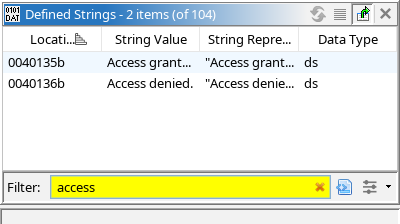
Double-click a row and the Listing jumps to the string. Next to it, Ghidra shows where it is used:
                     s_Access_granted._0040135b              XREF[1]:     main:00400603(*)
0040135b     ds      "Access granted."
XREF is short for cross-reference. A cross-reference records that one place in the binary refers to another. This one says the string at 0x40135b is used by one instruction, at 0x400603, inside main. Double-click the reference and you are at that instruction, with the Decompiler showing the code around it.
This is the most useful move in static analysis: find a string, follow its cross-reference, and land in the code that deals with it. A binary with a thousand functions has only a few that mention Access granted. or Invalid license, and a cross-reference takes you to them directly. You can also ask from the other direction: click any function, string or variable and press Ctrl+Shift+F to list everything that refers to it.
Following it here lands us in main:
1undefined8 main(void)
2{
3  int iVar1;
4
Now the guess is confirmed. Our input is compared with maintenance-7731 by strcmp, which returns 0 when two strings are equal. The rest of the function is the real check, and it has two parts: a memcmp against four bytes at DAT_00401348, and something called crc32.
Start with the memcmp. Ghidra did not show a string there, only a label, DAT_00401348, because it was not sure those bytes were text. Double-click the label and the Listing shows the bytes 49 46 43 7b. Those are character codes:
printf '\x49\x46\x43\x7b\n'IFC{So the password has to begin with IFC{, the IFC{ that strings listed. That is the format the program was complaining about. When Ghidra shows a DAT_ label where you expect text, look at the bytes. You can also tell Ghidra what they are: click the label's address in the Listing, press T, and choose string.
Text can hide better than that. Build the program with optimization and look at how the same two comparisons come out:
gcc -std=gnu17 -O2 -no-pie -o chall-O2 source.c1 if ((CONCAT44(uStack_44,local_48) == 0x616e65746e69616d && local_40 == 0x313337372d65636e) &&
2 (Both function calls are gone. Comparing four bytes is the same as comparing one 4-byte number, and comparing sixteen bytes is the same as comparing two 8-byte numbers, so the optimizer did that instead of calling memcmp and strcmp. The strings turned into the numbers 0x7b434649, 0x616e65746e69616d and 0x313337372d65636e.
Look at 0x7b434649 one byte at a time: 7b, 43, 46, 49. Those are the codes for {, C, F and I. It is IFC{ backwards, because x86 is little-endian and stores the lowest byte of a number first. The other two decode the same way, to maintena and nce-7731.
The practical rule: when a decompilation compares against a large constant and every byte of it falls between 0x20 and 0x7e, the range of printable characters, it is probably text. Read the bytes from right to left. In Ghidra, right-click the constant and Convert offers a character view that does this for you.
This also shows the limit of strings. In this build maintenance-7731 happens to remain in the file, but no code refers to it, so its cross-reference list is empty and following it leads nowhere. A program can also build its strings one character at a time, or keep them encrypted until they are needed, and then strings shows nothing at all. Obfuscation returns to that.
Numbers used as markers are called magic numbers, and the most common kind identifies a file format. Most formats begin with a fixed signature so that programs can recognize them. file works by checking for these, and so does any program that reads files. Our own binary starts with one:
head -c 16 chall | hexdump -C00000000 7f 45 4c 46 02 01 01 00 00 00 00 00 00 00 00 00 |.ELF............|00000010The first four bytes, 7f 45 4c 46, are the ELF signature: the byte 0x7f and then the letters ELF. A few others worth knowing by sight:
| Format | First bytes | As text |
|---|---|---|
| ELF | 7f 45 4c 46 | .ELF |
| PNG | 89 50 4e 47 0d 0a 1a 0a | .PNG.... |
| ZIP | 50 4b 03 04 | PK.. |
25 50 44 46 | %PDF | |
| gzip | 1f 8b |
These matter in two ways. When you find a block of unknown data inside a binary, its first bytes may tell you what it is. A PK in the middle of an executable is an embedded ZIP archive. And when code compares the start of a buffer against one of these values, you know what kind of file it expects. Keep the byte order in mind: a program checking for ELF by comparing a 4-byte number compares against 0x464c457f, the signature backwards.
The last piece of main is the call to crc32. In this binary the function has a helpful name. Suppose it did not, and all we had was the code:
1uint crc32(long param_1,ulong param_2)
2{
3  int local_1c;
4  ulong local_18;
We could work through this. It walks a buffer one byte at a time, and for each byte it does something eight times involving shifts and XOR. Understanding exactly what would take a while.
There is a shortcut. The function contains an unusual number, 0xedb88320. Nobody picks a value like that by accident. Search for it and you will find that it is the polynomial used by CRC-32, the checksum in ZIP files, PNG images and Ethernet. Starting from 0xffffffff and inverting the result at the end are both part of the standard CRC-32 too. We now know what the function computes, we know its inputs are a buffer and a length, and we can rename it and its variables without tracing a single loop.
Hashes, checksums and ciphers nearly all depend on fixed numbers like this, and those numbers are the same in every implementation, in every language, at every optimization level. A few come up constantly:
| Constants | Algorithm |
|---|---|
0xedb88320, or 0x04c11db7 | CRC-32 |
0x67452301, 0xefcdab89, 0x98badcfe, 0x10325476 | MD5, and the start of SHA-1 |
0x6a09e667, 0xbb67ae85 | SHA-256 |
0x9e3779b9 | TEA and XTEA |
0x811c9dc5, 0x01000193 | FNV-1 hash, 32-bit |
A 256-byte table starting 63 7c 77 7b | AES |
You do not need to memorize them. The habit to build is noticing a constant that looks too specific to be arbitrary and searching for it before reading the code around it.
Knowing the algorithm changes what the check means. main accepts a password when its CRC-32 equals 0x5b297300. A checksum throws information away, so there is no reading the password back out of that number the way we read the PIN out of .data in the Data & Types lesson. What static analysis gives us is the exact condition, and that turns the problem into a different one: finding an input with a given CRC-32. That is a known problem with known tools, since CRC-32 was never designed to resist it.
We wrote this program, so we can confirm the reading. The intended password is IFC{crc_1s_n0t_a_l0ck}, and an independent CRC-32 implementation, the one in Python's zlib, gives the same value the binary compares against:
python3 -c "import zlib; print(hex(zlib.crc32(b'IFC{crc_1s_n0t_a_l0ck}')))"0x5b297300echo 'IFC{crc_1s_n0t_a_l0ck}' | ./challPassword: Access granted.One caution about constants. In chall-O2, the same comparison reads uVar2 == 0xa4d68cff. The optimizer removed the final inversion and inverted the constant instead, as it merged the two constants in the pipeline lesson. Values that the algorithm defines, like 0xedb88320, stay put. Values the program compares its results against may be rewritten.
strings first. The author's strings sit together in .rodata, so one recognizable message leads to the rest.XREF, and you are in the function that matters.That completes the core of the course: control flow, data and types, functions and calls, and the landmarks that tell you where to apply them. Every binary so far has been cooperative, with its symbols, its library calls and its strings in plain view. The next section takes those away one at a time, starting with Stripped Binaries.
